


The Denver Post
2.2815.00 Reviews
App Specs
- Version
- 10.0.60
- Updated On
- License
- Free
- Downloads
- 100,000+
- Developer
- MediaNews Group
- Categories
- News & Magazines
- Platform
- Android
Screenshots


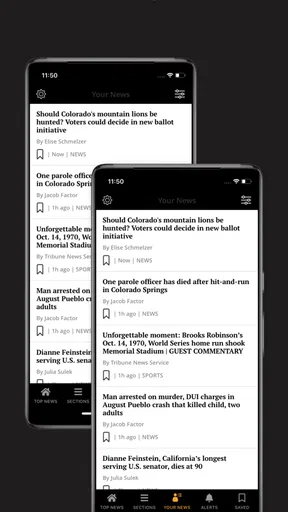

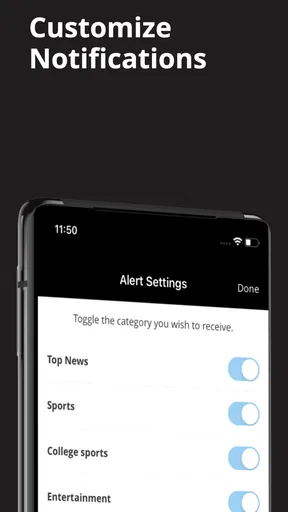



 Analysis by AppCompare
I approached The Denver Post as a practical news-reading app rather than as a complete replacement for every news source on my phone. Developed by MediaNews Group, it focuses on Denver-area coverage while also bringing together Broncos, Avalanche, Nuggets, Rockies, weather, and other local updates. That focus is its main reason to exist: if your daily routine depends on Colorado news and sports, having those subjects gathered in one place can be more convenient than searching across several websites.
The app is free to install and is aimed at readers aged Everyone 10+. It belongs to the News & Magazines category, runs on Android 8.0 or later, and has reached over 100 thousand installs. Those details make it accessible to a broad range of Android phones, although compatibility alone does not guarantee the same experience on an older device as on a newer one.
My overall impression is mixed. The subject coverage is useful, especially for readers who want a local angle instead of a broad national news feed, but the average rating of 2.2 from around 1.3 thousand ratings suggests that many users have encountered enough friction to affect their opinion. I would not dismiss the app because of that figure, but I would treat it as a reason to test the experience carefully before making it part of my everyday news routine.
How quickly the app gets me to the news
For a news app, speed is not only about how quickly a screen appears. It is also about how quickly I can identify what matters, open a story, and return to the main feed without losing my place. The Denver Post has a clear advantage when I already know what I am looking for. A reader checking a Broncos update, a weather item, or a local development has a more direct path than someone starting with a general search engine.
The focused subject mix also reduces the need to sort through unrelated national headlines. In the morning, I can use it as a local briefing: scan the main news, check the weather, and look at the latest team coverage. That is more efficient than opening separate sports pages and a separate local-news source, particularly when I only have a few minutes.
At the same time, a focused app can feel slower when I want a wider view of the world. I still need another source for national and international context, so this is not the kind of application I would use as my only news window. A general news aggregator is usually faster for comparing many publishers or moving between unrelated subjects. The Denver Post is more useful when local relevance matters more than breadth.
Readers should also keep expectations realistic about perceived speed. A news app depends on the freshness of its feed and the connection available at the moment, so an article may not feel equally immediate in every situation. On a stable connection, the experience is most valuable when I use it with a clear purpose rather than repeatedly refreshing without a specific story in mind.
Worth Reading Before You Choose

EA SPORTS FC Mobile 26 Is a Bigger Football Game, but It Takes Time

Flipboard Shows What News Apps Must Do Beyond the Feed

Switching to Android Auto Means Rethinking Your Driving Routine

Google Calendar Makes a Crowded Week Easier to Manage

Ludo King Makes the Most of the Minutes Between Plans

Baby Panda World Brings Quick Play to Modern Phones, but Its Game Library Feels Busy
Where the focused layout helps
The sports emphasis is one of the more practical parts of the experience. Instead of treating local teams as occasional items inside a huge national stream, the app gives Broncos, Avalanche, Nuggets, and Rockies coverage a prominent role. That makes it a good companion on a game day, when I want local reporting and team news without manually checking four different sections elsewhere.
There is a useful trade-off here. A fan who follows several Denver teams may appreciate the concentration, while a casual reader may find the sports presence more prominent than expected. I would recommend it more strongly to someone who wants a local newspaper-style mix than to someone searching only for one narrow team feed.
Weather is another reason I can imagine opening the app repeatedly. A quick local check before commuting, walking the dog, or planning an outdoor activity fits naturally alongside news. I would still use a dedicated weather service when timing, alerts, or detailed forecasts are critical, but the inclusion makes the app more convenient for a quick glance.
What happens during heavier use
The most demanding moments are likely to be the ones when many readers are checking the same developing story or following sports coverage around an important event. In those situations, I would judge the app less by its ability to show one article and more by how comfortably it supports repeated movement between the feed, individual stories, and related updates.
That is where a local publication app can be more useful than a basic web search. The editorial context is gathered around the same regional audience, so I can move from a headline to connected coverage without rebuilding the search from scratch. For a developing Denver story, that workflow is more coherent than opening several unrelated results.
However, heavy use also exposes the limits of relying on one app. If I am monitoring a rapidly changing event, I would cross-check important details with another trusted source rather than assuming one feed is sufficient. The Denver Post works best as a strong local perspective, not as a guarantee that every update will appear first or that every national angle will be represented.
For sports fans, the practical workflow is to open the app before a game, browse the team-specific coverage, and return afterward for local reaction. That is more useful than leaving the app open all day and expecting it to replace live scores, broadcasts, or dedicated sports tools. Its value is in reporting and local context, while specialized alternatives remain better for play-by-play information.
Stability and recovering after interruptions
News reading is often interrupted. I may open an article while waiting for a bus, switch to a message, lock the screen, or lose connectivity while moving between networks. A reliable app should make it easy to resume the same task instead of forcing me to remember the headline and start again.
My advice is to treat the application as a reading tool that works best when I give it a moment to load before jumping rapidly between several stories. That simple habit reduces frustration on an older phone or a busy connection. If an article does not appear immediately, I would avoid repeatedly tapping the same control; returning to the section and reopening the story is usually a cleaner recovery path.
The app’s long history is worth noting. It was released on October 22, 2010, and the current version is 10.0.60. That suggests an established product rather than a brand-new experiment, but age alone is not proof of perfect stability. What matters to me is whether the current build feels dependable on my particular phone and whether it recovers gracefully after a pause or connection change.
The relatively low average rating makes reliability a central question for prospective users. I would not interpret it as evidence that every device will have problems, but I would pay attention during the first few sessions. If the app repeatedly interrupts reading, loses my place, or makes basic navigation feel uncertain, the convenience of local coverage may not compensate for that friction.
Older phones, storage, and everyday device limits
Because the minimum operating system is Android 8.0, the app remains available to people who are not using the newest hardware. That is helpful for anyone keeping an older phone, but an older operating system often comes with other constraints: less free storage, slower multitasking, and more aggressive background management. Those factors can affect how quickly a news app opens or resumes even when the app itself is compatible.
I would install it with some storage headroom rather than treating a nearly full phone as a fair test. News apps commonly handle changing article content, images, and feed updates, so a device under pressure may make the whole experience feel less responsive. Closing unnecessary apps before judging this one can also help separate phone limitations from app-specific behavior.
Battery-conscious readers may prefer opening the app only when they intend to read instead of leaving it running throughout the day. That is a sensible habit for any news application, especially on an older device. I would also compare its behavior with the mobile website on my phone: if the browser is already quick and comfortable, the app needs to offer noticeably better organization or convenience to justify the extra installation.
There is no reason to assume that the minimum supported Android version delivers the same smoothness as a recent phone. My practical recommendation is to test three tasks before committing: open the main feed, enter a longer article, and switch away and back again. Those simple checks reveal more about real-world performance than the compatibility label by itself.
Free access and the subscription decision
The app is free to download, which makes trying it straightforward. That is important because local-news habits are personal: some readers enjoy a publication’s style immediately, while others prefer a broader aggregator or a browser. I would use the free entry point to decide whether the organization of local news, sports, and weather fits my routine before considering any paid option.
In-app purchases are listed from around fifteen dollars to around one hundred seventy-five dollars per item. Those are substantial differences, so I would read each purchase screen carefully and avoid assuming that installing the app automatically means I need to buy anything. The right choice depends on how much I value this publication’s reporting and what access each option actually provides.
This pricing structure also changes who should choose the app. A regular Denver-area reader who wants one publication at the center of a daily routine may find a paid option worth evaluating. Someone who only checks occasional headlines, follows national news, or already pays for another local source should compare the added value first. Free alternatives may be enough for quick headlines, while this app is more appealing when local reporting and sports context are the priority.
I would also consider the cost alongside the reading experience on my device. Paying for access does not solve sluggish navigation or compatibility frustrations. The sensible order is to test the free app, confirm that the sections I care about are easy to reach, and then decide whether the available purchase matches my actual reading habits.
Who will get the most from it
The strongest audience is someone living in or closely connected to Denver who wants local news in a publication-centered format. It is especially suitable for readers who move between civic stories, regional weather, and several Colorado sports teams. Instead of assembling that combination from separate apps, I can begin with one local source and branch out only when I need specialized information.
It can also suit a commuter who wants a short morning routine. I would open the app before leaving, scan the leading local items, check weather, and save the deeper stories for a quieter moment. The key benefit is not endless scrolling; it is having a recognizable local starting point that helps me decide what deserves more attention.
I would recommend skipping it if the main goal is global coverage, detailed financial reporting, live sports statistics, or highly specialized weather information. A national news app, dedicated sports application, financial publication, or weather service will usually be better at those individual jobs. The Denver Post makes sense as a local layer in a broader setup, not necessarily as the only source on the phone.
Families should also remember the Everyone 10+ age rating when deciding whether it is appropriate for younger readers. News topics can vary in seriousness even when an app is broadly accessible, so I would still use personal judgment about what children read and how independently they use it.
My performance verdict after weighing the trade-offs
The Denver Post is most convincing when I use it deliberately: local headlines first, Denver sports coverage next, and weather as a convenient extra. Its focused editorial identity gives it a purpose that a general aggregator cannot fully reproduce. I like the idea of starting the day with one regional source rather than sorting through a noisy stream of unrelated stories.
Its weaknesses are equally important. The low average rating means prospective users should not ignore reports of friction, even though individual experiences can differ. Older phones may make loading and returning to articles feel less fluid, and readers who want one universal news app will quickly notice the limits of its regional focus. The presence of in-app purchases also means that “free to install” should not be confused with every form of access being free.
My final recommendation is cautious but positive for the right reader. If Denver news and the Broncos, Avalanche, Nuggets, or Rockies are part of your everyday interests, I think it is worth testing on your phone. Give it a few normal routines rather than judging it from one launch, and compare its speed and recovery with the mobile website you already use. If it handles your morning scan, article reading, and return visits comfortably, it can become a useful local companion.
If your priorities are broad national coverage, instant live scores, or a lightweight app with minimal reading friction, I would choose a specialized alternative instead. For me, the app succeeds not because it does everything, but because it brings a distinctly Denver-centered news habit into one place. Its best performance is measured by relevance and practical daily use, not by replacing every other news tool.
Pros
- Clear
- well-organized coverage of Denver and Colorado news
- Useful sections for sports
- politics
- business
- and local events
- App supports personalized news preferences and saved stories
- Breaking news alerts help users follow important local developments
- Digital subscription provides access to a broad archive of articles
Cons
- Many articles may be restricted to paying subscribers
- Advertising can make the reading experience feel less streamlined
- Some content may load slowly on weaker mobile connections
- Push notifications can become frequent unless carefully customized
- Coverage is primarily regional
- with limited national news depth
FAQs for The Denver Post
What is The Denver Post app?
The Denver Post app is a mobile news platform for readers who want convenient access to reporting from Denver, Colorado, and the surrounding region. After installing it, users can browse local news, politics, sports, business, entertainment, lifestyle stories, and other coverage. The app is designed for quick reading on a phone or tablet and may also provide breaking-news alerts and personalized access to important sections.
Is The Denver Post app free to download and use?
The Denver Post app can generally be downloaded without paying an installation fee, but access to all articles and features may depend on your subscription status. Some stories may be available to everyone, while other content can be limited by a digital paywall. Before downloading, check the current subscription options, trial terms, renewal price, and whether an existing Denver Post account can be used in the app.
Do I need a subscription to read articles in The Denver Post app?
A subscription may be required for unlimited access to premium journalism. The app can allow users to read selected articles without signing in, but frequent readers may eventually encounter a limit or subscription prompt. Subscribers should sign in with the account connected to their Denver Post membership. Availability, article limits, and subscription benefits can change, so review the latest terms inside the app.
What kind of news and features are available in the app?
The Denver Post app focuses primarily on news relevant to the Denver area and Colorado, including local reporting, state politics, crime, weather, transportation, sports, business, culture, and community events. Depending on the current version, it may also include breaking-news notifications, saved articles, section navigation, multimedia content, and sharing tools. The selection makes it more useful for local readers than for people seeking only national headlines.
Can The Denver Post app send notifications, and can I control them?
Yes, the app may request permission to send notifications about breaking news, major local developments, sports results, weather, and other updates. Notifications can be useful if you want timely information, but frequent alerts may become distracting. During setup or through your device settings, you can usually allow, block, or adjust notification permissions. It is worth reviewing these controls so the app matches your preferred reading habits and privacy expectations.


